
Portrait photography is all about what happens after the shoot. You can get the lighting just right, pick the perfect spot, and direct your subject perfectly, but even technically good photographs won’t be as good as they could be without good retouching. Portrait photo editing is what makes an excellent picture into one that a customer really adores.
This guide has everything working portrait photographers, headshot photographers, and studio owners need to know, from basic techniques like frequency separation and dodge and burn to real-world choices about how long retouching takes, whether to do it yourself, and when it makes more sense to hire someone else to do it. This full tutorial gives you a clear, honest look at what professional picture retouching really entails, whether you’re trying to improve your own process or find a trusted post-production partner.
Photodotedit is a global company that offers picture retouching as one of its main services to photographers and studios. Their editing staff works on RAW and high-resolution images, starting at just $1 per image. They focus on getting natural effects, so no over-smooth skin, fake finishes, or edits that seem like plastic.
What Is Portrait Retouching and What Does It Include?
Portrait retouching is the technique of improving the quality of a portrait image in post-production while keeping the subject’s natural look. It goes beyond merely changing the exposure and color to fix the small things about the complexion, eyes, hair, and general balance of the image.
In a professional setting, portrait retouching usually includes:
- Skin retouching: getting rid of blemishes, smoothing out the texture, and balancing out the tone
- Eye enhancement: making the iris sharper, whiter, and brighter
- Teeth whitening: a subtle brightening that doesn’t change the natural color of your teeth.
- Hair retouching: getting rid of flyaways and stray hairs, and cleaning up the edges
- Color correction and tone balancing: White balance, exposure, contrast, and saturation are all ways to fix color and tone.
- Lighting correction: Getting rid of harsh shadows, lowering glare, and balancing exposure that isn’t even.
- Background cleanup: Cleaning up the background is getting rid of small distractions or making the background less harsh.
- Body contouring (where appropriate): changing the shape of the body in a way that is moral
The amount of retouching that needs to be done depends on the type of portrait and what the customer wants. To take a corporate headshot, you need to do clean, professional work. A fashion editorial portrait can need more dramatic and stylized retouching. A family portrait session focuses on making sure that all of the pictures look the same and have a natural warmth. Each situation calls for a different response.
The Portrait Editing Hierarchy: Exposure, Color, Then Retouching
Understanding how professional retouchers work in a certain order helps you avoid wasting time. For instance, if you retouch the texture of the skin before finalizing the global exposure, you might have to reapply your local adjustments when the general tonal balance changes.
- Set the global exposure, highlights, shadows, whites, and blacks. Before anything else, make sure the general tone is right. If an image is too dark or too flat, every decision on how to fix it will be wrong.
- Fix the colors by changing the white balance to get rid of undesirable color casts. If you need to, change the color, saturation, and brightness for each channel. Skin tones are quite delicate; even a small hint of magenta or yellow can transform how the person looks. Before you start working on the skin, be sure the color is right.
- Use dodge and burn to shape light, fix exposure in specific areas, and get rid of shadows around the eyes or on the face. This is between global color work and detailed retouching.
- Retouching the skin and details. You should only move on to frequency separation, healing brush work, or texture refining after the image is balanced worldwide. Retouching an image that is adequately exposed and color-balanced gives results that look good on all screen and print sizes.
- Final sharpening and output is the last step, after all the pixel-level retouching is done. Depending on whether the image is intended to be printed, published on the web, or both, the output sharpening will be different.
Skin Retouching: Frequency Separation, Dodge and Burn, and the Healing Brush
Skin is the most complicated and examined part of any portrait. Each of the three main professional skin retouching methods addresses a distinct issue.
- Frequency Separation:
- Professional Photoshop users most often employ frequency separation for advanced skin retouching. It separates the image into two layers: color and tone on the low frequency and texture and fine detail on the high frequency.
- This allows you to repair uneven skin tone on the low-frequency layer without affecting the high-frequency layer’s natural texture. The skin seems smooth and even while retaining the pores, small wrinkles, and surface detail that distinguish it from computer renders.
- Frequency separation works well for:
- Mixed illumination causes uneven skin tone
- Blotchiness, sunburn, or redness
- Transitions between shadows and highlights that appear discolored
- Dodge and Burn:
- Most high-end beauty retouching uses dodge and burn. On a separate gray layer in Soft Light blend mode, carefully brighten and deepen skin highlights and shadows.
- Instead of smoothing the skin generally, this method sculpts the face by improving its dimensional structure. It takes much longer than frequency separation. A complete dodge and burn pass takes 30–60 minutes per image. However, skin seems three-dimensional, luminous, and refined without alteration.
- Headshots and family pictures benefit from a lighter healing brush and frequency separation.
- Healing Brush and Clone Stamp:
- Most photographers start with the healing brush. It uses adjacent skin texture to blend over blemishes, spots, and transient skin disorders.
- It works well on isolated defects like pimples, transient scars, and redness for portraits. Frequency separation or both methods produce more natural results for bigger uneven tone areas.
Eye Enhancement: Sharpening, Whitening, and Color Pop
Almost every portrait has its eyes as the main focus, and even small changes here can have a big impact on how the overall picture looks.
- Sharpening the iris: The iris and catchlights should be the sharpest parts of a portrait. A targeted sharpening pass with a layer mask maintains this change exact without adding noise to other areas.
- Whitening the sclera: The whites of the eyes can pick up red or colored light from the environment. A Hue/Saturation adjustment layer makes reds and magentas less bright in a masked selection that only covers the sclera. The idea is to get clean whites without the fake bright-white effect that makes it look like you’ve done too much editing.
- Iris color and contrast: Using the Burn tool along the outer ring and a focused Curves adjustment to increase micro-contrast in the iris adds depth and brightness. Don’t make the iris color too bright; it rapidly looks fake.
- Reducing under-eye shadows: Use the Dodge tool or a Curves layer masked to the under-eye area to brighten the area without getting rid of the natural shadow that gives the face its shape.
- Hair Retouching and Flyaways: Many underestimate hair retouching. Even gorgeous hair attracts light, creating frizz or stray strands that detract from the face.
- Handling Flyaways: Flyaways on clean, simple backgrounds are easily handled using the healing brush. At low opacity, the Clone Stamp tool improves blending and texture matching on complicated backdrops like foliage, textured walls, and clothing.
- Fixing Edges and Gaps: Path-based techniques using the Pen tool and layer masks offer precise edge correction without disrupting the background behind the hair for messy hair edges or conspicuous gaps.
- Color Correction for Hair: Skin and hair color correction are separate. A focused Hue/Saturation adjustment with a masked selection on the hair zone restores the color to its natural range without altering the remainder of the image if a backdrop or overhead light throws undesirable casts.
Body Contouring: Ethical Guidelines and Client Expectations
Liquify or Warp are used to contour subjects in post-production. One of the most sensitive aspects of portrait retouching, it poses problems regarding honesty, client communication, and professional responsibility.
- The Professional Standard: Most studios provide small, natural-looking modifications if the client demands them. Most professional photography organizations and photographers now consider significant alteration without client consent unethical.
- What Is Typically Acceptable:
- Portrait retouching limits body sculpting commonly to:
- Smoothing garment creases produces unattractive forms.
- Minor lens distortion artifact correction, Liquify tweaks
- Removing clothing-induced shadows
- Client Communication Comes First: Before contouring, ask the customer what they want and capture it. This safeguards the photographer and customer from overshooting or underdelivering.
High-End vs Basic Retouching: What’s the Difference?
The distinction between basic and high-end retouching goes beyond quality. Technical skill, time investment, and output goal.
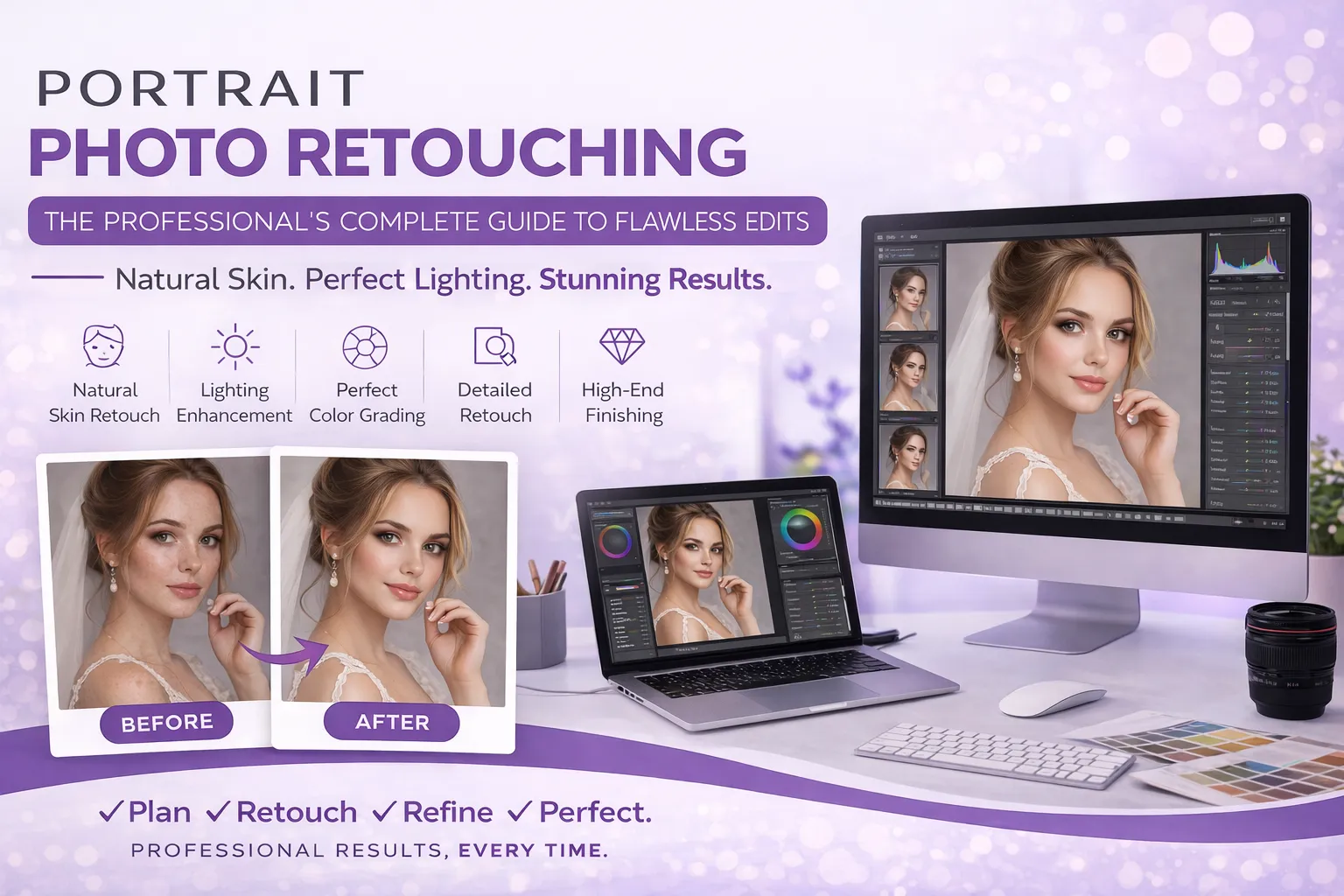
- Basic Retouching: Blemish removal, skin smoothing, teeth whitening, slight eye brightening, and global color and exposure correction are characteristic of basic retouching. For family portraits, school images, real estate headshots, and volume studio work, speed and consistency are more important than perfection. Each image takes 5–15 minutes.
- High-End Retouching: High-end retouching includes frequency separation, comprehensive dodge and burn, extensive eye improvement, precise hair, and body contouring. Image suitable for beauty, fashion editorial, premium branding, and executive portraiture. Expect 30–60 minutes per image, depending on complexity. Images for magazine spreads or large-format prints demand more work than LinkedIn profiles. Full-resolution high-end retouching holds edits at any size.
Photodotedit covers both levels. Basic portrait retouching starts at $1 per image. Advanced work, including dodge and burn, hair repair, and detailed skin refinement, falls between $2 and $6 per image.
Retouching for Headshots vs Editorial vs Family Portraits
The same rules for retouching apply to all sorts of portraits; the focus changes a lot depending on the situation.
- Headshot Retouching:
- Precision is needed for headshots. Images for LinkedIn profiles, company websites, speaker bios, and actor portfolios will be examined. It must be clean and accurate without retouching. Visible skin smoothing or augmentation quickly lowers the image’s professionalism.
- Even skin tone, clean sclera, crisp irises, and natural texture are key. Use modest teeth whitening, prevent dodge and burn unless necessary, and retouch hair tightly.
- Editorial and Fashion Portrait Retouching: Editorial style is more flexible. Retouching might be structured, dramatic, or obvious depending on the shoot’s creative direction. Dodge and burn is common. Skin can be extensively polished. Color grading and skin tones work when they support the editorial concept.
- Family Portrait Retouching: Family sessions require consistency that single-subject photos do not. Retouching 30 to 80 photographs from one session from many participants with different skin tones, ages, and complexions requires a systematic editing system.
Batch processing with accurate presets corrects globally. Selective retouching follows, with more detail on main subjects and lighter passes on background characters or group images.
Batch Retouching: Staying Consistent Across 50+ Images
One of the hardest things about editing a lot of portraits is keeping them all the same. If you haven’t kept a constant global baseline, an image that looks perfectly balanced on its own can look very different from the one before it.
- Start with a Session Baseline: Set a global baseline in Lightroom or Capture One before opening any Photoshop image. Automatically sync exposure, white balance, and color corrections across the batch. Every picture starts the same.
- Use a Fixed Retouching Sequence: Each image goes through the same stages in the same order to avoid inconsistencies from missing steps or changed approaches mid-batch.
- Compare Against Reference Images: Keep two or three session hero images active while working. To catch tonal drift or color shifts before they spread across the batch, compare your image to them periodically.
- Limit Your Session Length: Over time, eye strain makes retouchers edit heavier or lighter. Take pauses and limit rigorous retouching to two to three hours.
If you need to edit a lot of portraits—50 to 500 at a time—the consistency argument alone is a good incentive to use a professional editing service. Photodotedit can handle a lot of portrait sessions at once while keeping the quality of the job consistent across the whole order.
How Long Does Portrait Retouching Take?
How long it takes to retouch a portrait depends on how much work needs to be done and how complicated the picture is.
| Retouching Level | Typical Time Per Image |
| Basic (healing brush, tone correction) | 5 – 15 minutes |
| Intermediate (frequency separation, targeted corrections) | 15 – 30 minutes |
| High-end (dodge and burn, full eye and hair work) | 30 – 60+ minutes |
For a studio that takes 10 portraits a week and wants to do intermediate-level retouching, that’s 150 to 300 minutes (two to five hours) of retouching every week. If you scale it up to a headshot photographer who takes 30 to 50 pictures a week, the time investment becomes a big portion of the work week.
DIY vs Professional Retouching: Time Cost Analysis
You should decide whether to retouch your own portraits, not if you can. It’s about whether retouching is worth your time.
If you charge $75 per hour and a 50-image session takes five hours, you lose $375 in opportunity cost, or time you could have spent marketing, shooting, cultivating client relationships, or sleeping.
Professional portrait retouching costs $1–$6 per image, depending on difficulty. A 50-picture session costs $150, or $3 apiece. Before considering that dedicated professional retouchers work on skin and photos daily, the math isn’t close.
- It makes sense to do your own retouching when:
- You have a unique way of retouching that needs your particular touch.
- The volume is modest enough that the time commitment is doable.
- You are actively learning and getting better at retouching.
- When it makes sense to hire a professional to retouch:
- Volume is going up, and editing is taking time away from filming and running a business.
- You want outcomes that are always excellent quality and don’t take a long time to modify for each assignment.
- The cost per image is less than what your hourly rate would allow.
When to Outsource Portrait Retouching
Once you know how time and cost are related, outsourcing portrait retouching is an easy business choice. These are the apparent signs that you need to hire a professional editor.
- Your list of things to edit is becoming longer. If you still haven’t altered the portraits from last week’s session and this week’s sessions are already lined up, the backlog is a sign of a throughput problem that will get worse as your business grows.
- You’re spending more time on editing than on shooting. If you spend more time in post-production than you do taking pictures, your workflow is out of whack.
- You’re not being consistent anymore. When you rush through retouching to meet deadlines, consistency is frequently the first thing to go. People who work for you notice.
- You wish to grow. You need operational capacity to add clients, photograph additional sessions, or go into new portrait markets. You can’t acquire that capability if you spend 20 to 30 hours a week in Lightroom and Photoshop.
Photodotedit was created for this change. Expert retouching, which includes dodge and burn, hair repair, eye augmentation, and skin refinement, costs $2 to $6 per image. Basic portrait editing costs $1. Individual photographers and large picture studios can use the service. Continuous quality, a free initial edit, and limitless changes till the output matches your style criteria are guaranteed.
The technique is straightforward. Upload your files to their private portal, tell them what you want, and get retouched portraits in 24 hours. Review the results and request free modifications.
Start Today – $1 Per Image
Portrait retouching is a field that values organized thinking, technical accuracy, and patience. In 2026, running a successful and high-quality portrait photography business means knowing the order of corrections, how to do each area of the portrait correctly, and when to get expert help.
Photodotedit is worth a try if you want to stop doing retouching and obtain consistent, natural effects on every portrait, starting at $1 per image. For free, send your first picture and discover what expert portrait retouching looks like on your own work.
What is the difference between basic and advanced portrait retouching?
Basic editing includes getting rid of blemishes, smoothing out skin, whitening teeth, and fixing colors all over the photo. High-end retouching includes frequency separation, dodge and burn, advanced eye and hair treatment, and precise texture refining. This makes the photos look more polished and works well for journalistic, commercial, and luxury picture work.
How long does it take to professionally retouch a portrait?
It takes 5 to 15 minutes to do basic retouching on each photograph. It takes 15 to 30 minutes to do intermediate retouching. It can take 30 to 60 minutes or more per image to complete high-end retouching that includes dodge and burn and careful polishing.
What does “frequency separation” mean in skin retouching?
With the Photoshop method called frequency separation, you may split an image into two layers: one for tone and color and one for texture. This lets you fix uneven skin tones without changing the texture of the skin, and vice versa.
When should I hire someone else to do portrait retouching?
When you have a lot of editing to do, and retouching takes longer than your hourly rate, when your backlog is expanding, or when you want to build your business without being constrained by post-production capacity, outsourcing makes sense.
What is the price of professional portrait retouching?
Photodotedit and other professional portrait retouching services charge between $1 and $6 each image, depending on how hard the process is. Basic retouching costs $1 per picture, but more extensive retouching, like dodge and burn and precise skin treatment, costs between $2 and $6.
Is there a free trial for Photodotedit?
Yes. New customers can get a free first edit from Photodotedit, with no strings attached. Send in sample photos and have them back altered to your liking before you pay for them. You can make as many changes as you like for free till the result satisfies your style standard.